
From policy to product: How Singapore is building more accessible digital services
11 November 2026
Category
Tech for Public Good
Digital Government
Discover how Singapore is turning digital accessibility from national policy into everyday practice, from the Enabling Masterplan 2030 to what designers learn from the citizens who use their services, and how AI can help teams scale accessibility work.
Consider a 70-year-old opening a community app for the first time. She wants to sign up for a gardening class in her neighbourhood. The button she needs is on the screen, but the text is small, the layout is crowded, and she cannot tell what steps she needs to take to complete her registration.
Her experience in completing the task is shaped long before she picks up her phone: from the nation's inclusivity and accessibility commitment to the choices designers make and how early agencies spotted potential barriers.
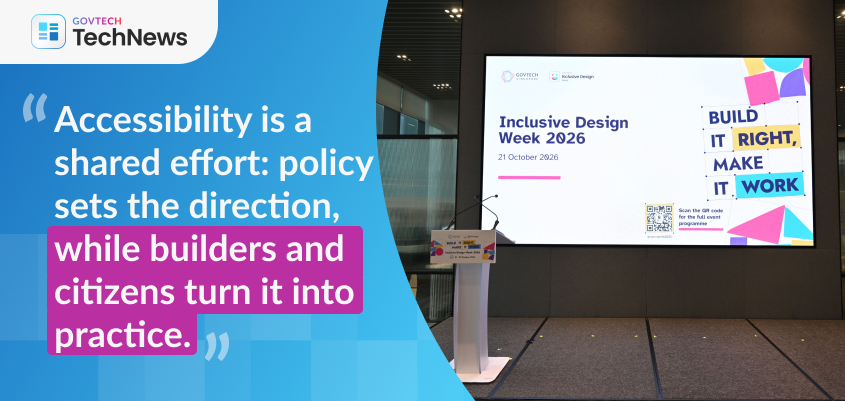
At Inclusive Design Week 2026, three sessions looked at each of those decisions in turn: the national commitment, the citizen's experience, and the tools that help government agencies deliver a better experience at scale.
Policy: Where Singapore is headed
Ang Wei Hong, Deputy Director for Sector Strategy and Planning at the Ministry of Social and Family Development (MSF), began with a simple point: accessibility needs vary from person to person. A person with hearing impairment, a person with autism and a person with a physical disability may each need something different from the same service.
Having inclusive thinking underpins the Enabling Masterplan 2030 (EMP2030) (opens in new tab), Singapore's roadmap for a more inclusive society, developed with people, private and public sector partners, including persons with disabilities. It is also the first masterplan to set measurable targets. For digital teams, this translates into a clear target: by 2030, every government website with more than a million visits a year should be accessible. These are the services citizens turn to most, so making them accessible to all citizens becomes non-negotiable.
Wei Hong highlighted that one in two healthy Singaporeans aged 65 today could become severely disabled in their lifetime. With that possibility ahead of us, accessibility is no longer about other people. It is also about preparing our future selves.
Policy sets the direction to prepare Singapore for what is to come, and citizens are the ones directly experiencing its impact one interaction at a time: logging in to a government service, finding a form, joining an activity at the community club.
People: Designing for our future selves
By 2030, one in four citizens will be aged 65 and above, just as essential services and community life move online. A digital service that does not work for older adults will fail a quarter of the population; hence services must adapt quickly to fulfil the needs of an ageing population.
Amanda Leung and Denise Yeo, UX Designers at GovTech Singapore, shared how they designed a digital service that seniors can use with confidence, drawing on their work on the People's Association's Community App for residents aged 50 and above.
Fear holds seniors back more than ability
An earlier pilot made the real barrier clear. Many seniors were reluctant to tap on buttons or explore unfamiliar features because they feared getting lost and not knowing how to get back to homepage or making a mistake they could not undo. As a result, they chose to simply scroll through the screen rather than interact with it.
This led the team to come up with a guiding principle: design for dignity, not dependency. Every action should feel reversible, secure and transparent. In practice, that meant one main action per screen, high contrast, large touch targets, familiar icons, and language support for citizens of different races.
How 2,000 seniors value-added to the team
Establishing sound principles was only the starting point. The team needed real-world proof, because what they had in mind might not suit the people using it. Across more than 30 onboarding sessions at Community Clubs and Residents' Networks, they observed over 2,000 seniors using the app.
The process helped uncover four issues that might otherwise have gone unnoticed: Larger fonts broke layouts. The team capped text scaling at 1.7x and made large-font checks a standard part of their design process.
Slow phones triggered repeat taps. Without instant feedback, users tapped again and sent duplicate requests. Loading states now confirm the first tap registered.
English-only text created anxiety. Some forms even rejected non-English input. The fix is multi-language support across all input fields.
Seniors act through people they trust. Deep links now let a neighbour share a task and land the recipient on that exact page.
Fieldwork like this is invaluable, but teams may not always have the capacity to conduct multiple rounds of user testing for every product they build. To identify barriers earlier, and across many services at once, teams need additional support to scale their efforts and work more efficiently.
Implementation: Using AI without losing the human check
AI is becoming part of how we work, and it can speed up accessibility efforts too, but only if it is used with care.
GovTech's A11y Consult, which sits within the Chief Digital Experience Office, took on that question in a hands-on workshop led by accessibility auditor Dallon Au, UX designer Jessie Hoong and software engineer Tan Keng Hwee.
Dallon, who uses a screen reader, showed the audience how seemingly small design choices can affect accessibility for the visually impaired by putting a series of everyday choices to the audience: could he use this, or not? Bold, enlarged text may look like a heading, but a screen reader cannot recognise it unless proper heading styles are used. Similarly, a link that says "click here" means nothing when a screen reader reads out every link on the page, making descriptive link text essential. Merged table cells can also leave him hearing numbers without knowing which column they belong to.
The final round caught most of the room by surprise. An AI-generated image description for a vaccination email read well, yet it was overly lengthy, referred to a button that users could not click in an image, and gave conflicting age eligibility criteria: first above 65, then 60 and above. Dallon noted that this is how AI errors can slip through: descriptions may sound fluent and confident, leading users to overlook inaccuracies.
Giving AI a better brief
The team's answer is SPELL, a framework to effectively utilise the capabilities of AI:
Set the role,
Identify the People it is for,
Explain the purpose,
set Limits and rules, and
Let the AI flag doubt.
Each step gives AI what a careful human writer would already know: who is writing, who will be listening, why the image is there, and specific details, such as dates and ages. The last step involves asking the AI to state what it assumed and what it could not tell, so reviewers know the gaps to look at first.
The difference was clear in a side-by-side test. Given the same image of a kopitiam counter, the same AI produced "Image of a kopitiam counter with cups" from a basic request. With SPELL, it produced the event name, date, time, venue and accessibility details that a listener truly needs.
The workshop concluded with three takeaways: compliance claims should be backed by testing, AI should not be relied upon to interpret the meaning of images without human review, and testing with persons with disabilities remains essential. It is no doubt that AI helps teams work more efficiently, but human oversight is still required to check the final outcome and ensure accessibility needs are truly met.
From commitment to practice
Policies can only set the standards an app must meet, but it is the team behind the app that will shape overall user experience, ensuring that it is accessible and easy for users to navigate.
Want to build more accessible digital services? Contact the team at digital_inclusivity@gt.tech.gov.sg